
REVIEW · NAIROBI TOURS
Kenya Data eSIM from 0.5GB daily to 20GB 30 Days
Getting online fast in Nairobi can make or break your trip. This Kenya eSIM is built for exactly that moment, with a QR code you can receive in minutes and install right away, so you can map routes, translate signs, and message home without hunting for a SIM shop first. I also like that validity starts when you install, not when the calendar says so, which gives you more control if your flight is delayed. One thing to watch: it is data-only, so you will not get a phone number for calls or SMS.
What makes it especially useful is the flexible plan structure. You can choose daily-style data resets or a fixed high-speed allowance, and after the fast portion is used, you switch to unlimited data at reduced speed (128 kbps) for messaging apps. The potential drawback is the same across many “unlimited” plans, once you hit fair-use limits set by the local network, speeds can drop sooner than you expect, so heavy streaming can burn through your allowance fast.
In This Review
- Key things to know before you buy
- What you’re really booking in Nairobi
- QR code to connected, step by step
- Daily plans vs fixed plans, and why it changes your trip
- Daily-style plans (resets every 24 hours)
- Fixed plans (one high-speed allowance)
- The real-world “unlimited” catch
- Hotspot support is useful, but don’t overpromise yourself
- Data-only means you need a backup for calls
- Compatibility checklist, the step that prevents headaches
- What “30 days” feels like, real trip planning advice
- Connection quality: what to expect from 4G LTE to 5G
- Support and help, what you can do if it goes wrong
- Value check: is $3.98 a smart deal for your Kenya days?
- Who this eSIM suits best
- Should you book this Kenya eSIM?
- FAQ
- How fast will I receive the Kenya eSIM QR code?
- When does the eSIM plan start working?
- Do I need to install the eSIM right away after purchase?
- Is this eSIM data-only or does it include calls and SMS?
- Does the eSIM support mobile hotspot?
- What speed should I expect in Kenya?
- Is the device required to be unlocked?
- Is there a “daily reset” option?
- What happens after I use my high-speed data?
Key things to know before you buy

- QR code delivery is quick, usually within minutes after purchase
- Install starts the clock, since the eSIM plan begins on installation
- Data-only, with no voice or SMS
- Hotspot is supported, so you can share your connection
- 4G LTE or 5G speeds depending on local availability
- Compatibility matters, especially if your phone was bought in China or Hong Kong
What you’re really booking in Nairobi
This isn’t a classic tour with a guide meeting you by a landmark. It is a Nairobi-focused digital “get online” setup. You start with Kenya as your target country, and once you install the eSIM, your job is basically to keep it working on your phone as you move around.
The biggest travel win here is time. Instead of wasting an evening at a SIM counter, you can set things up before or on arrival, then use data immediately. That matters in Kenya because navigation apps, rideshare calls, hotel confirmations, and even basic translation often depend on connectivity.
Price-wise, $3.98 per person for a 30-day data plan is low compared to what you might spend on local SIM hassle. The value depends on one detail: how much of your trip you spend doing data-heavy stuff like video calls, live maps, or streaming.
A few more Nairobi days worth pricing up
- Nairobi National Park Half-Day Tour; Free Wi-Fi connection
★ 5.0 · 878 reviews - Nairobi: National Park & Optional Elephants & Giraffe Center
★ 4.8 · 874 reviews - NAI NAMI: Nairobi Storytelling Tour with Street Children
★ 5.0 · 792 reviews
QR code to connected, step by step

Here’s the simple flow, and it is designed to be mostly hands-off once you have the QR code.
1) Receive the QR code within minutes
After booking, you get an email with a QR code. In practice, this is one of the most praised parts of the experience: people tend to get the code fast and find the instructions clear.
2) Scan the designated QR code to install the eSIM
You set up the eSIM by scanning that QR code on your phone. The plan then activates with the start date tied to installation, not purchase day.
3) Decide when to start using it
You have a strict window: start using it within one month of purchase. If you buy it early, just wait until you are ready to install so you do not waste time.
4) Expect mobile network speeds (4G LTE or 5G)
Once installed, you connect to major local networks in Kenya, listed as Zain, typically on 4G LTE or 5G depending on coverage.
If your travel schedule is tight, I recommend installing as close to arrival as you can. Doing it too early can shorten the useful part of your trip.
Daily plans vs fixed plans, and why it changes your trip
The plan works in two modes, and knowing the difference can save you from frustration.
Daily-style plans (resets every 24 hours)
For daily plans, your usage resets every 24 hours. After that day’s high-speed portion is used, you still get unlimited data at reduced speed of 128 kbps for messaging apps.
What this means for you: daily plans can be great if your phone use is spiky. Think, sending WhatsApp messages, grabbing directions for short periods, checking email, and doing light browsing each day.
Same trip, a different part of the country:
- Nairobi National Park Half-Day Game Drive
★ 4.5 · 738 reviews - Nairobi: Historic and Modern Highlights Walking Tour
★ 4.8 · 703 reviews - Safari Tour; Nairobi National Park
★ 4.5 · 594 reviews - 3 Days Masai Mara Group Joining
★ 5.0 · 486 reviews
Fixed plans (one high-speed allowance)
Fixed plans give you a selected high-speed data amount. Once that allowance is used up, you move to unlimited data at 128 kbps for messaging apps.
What this means for you: fixed plans can be better if you know you will use data fairly evenly over the month, or if you can avoid big downloads after you hit your limit.
The real-world “unlimited” catch
Even with the word unlimited, these plans can follow local fair usage behavior. One common complaint is that data can feel like it runs out fast, leading people to buy multiple bundles back-to-back. The provider response points to fair usage limits triggered after you burn through the advertised high-speed portion, even though the plan advertises unlimited.
So here is my practical advice: assume high-speed is the thing you are paying for, and treat reduced-speed messaging as a safety net, not your main connection for the whole trip.
Hotspot support is useful, but don’t overpromise yourself
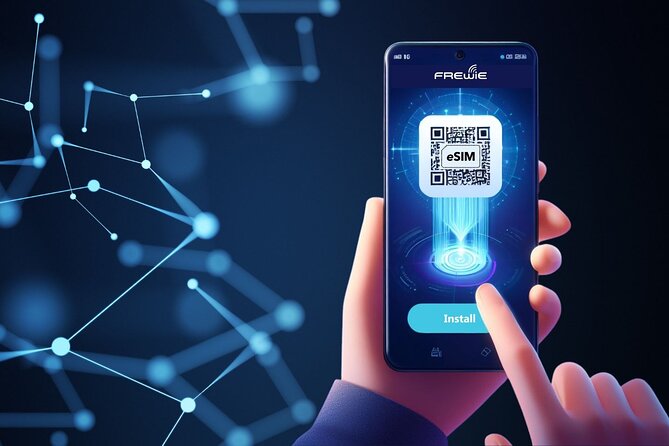
This eSIM supports mobile hotspot. That is handy if you have a tablet, a laptop you need for work, or multiple people sharing one connection.
But hotspot changes the math. If you turn your phone into a router, you often end up using more data than you would on your phone alone, especially for things like cloud sync, browser tabs, or video.
If you plan to hotspot, plan your habits:
- Use it for messaging, document work, and navigation.
- Avoid streaming or large uploads once you start hitting reduced speeds.
Data-only means you need a backup for calls
The plan is mobile data only. It does not include a phone number for calls or SMS.
If you rely on a Kenyan number for two-factor login or for calls to services, you will need a workaround you already use at home, like:
- your usual messaging apps (WhatsApp, iMessage, Signal)
- app-based calling that runs on data
- Wi-Fi calling if your phone supports it
If you are traveling as a solo traveler and you already live inside apps, you will likely be fine. If you need SMS codes, you will want to confirm you can receive them through your existing number elsewhere before you land.
Compatibility checklist, the step that prevents headaches
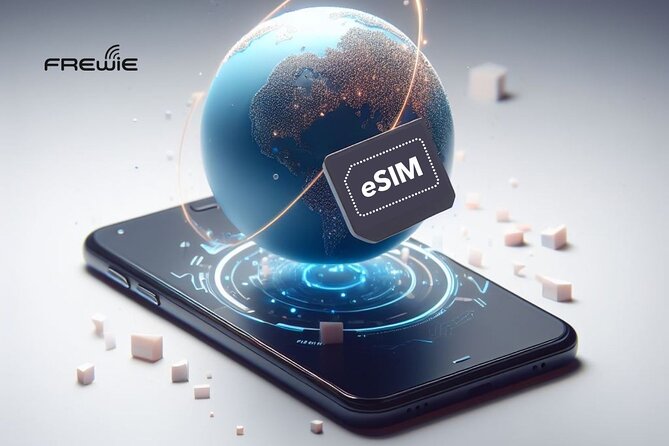
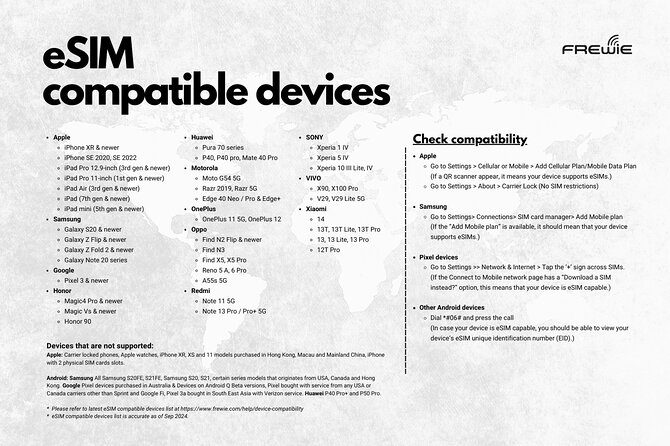
This eSIM works only with eSIM-compatible devices that are not carrier locked.
The provider also flags an important detail: many phones bought in China and Hong Kong might not support eSIM. So before you trust the plan, do one quick check:
- confirm your phone model supports eSIM
- confirm it is not carrier-locked
- if you are unsure, check online or contact your service provider
The practical takeaway: this is the moment to spend 5 minutes being safe, rather than gambling on whether your phone will accept an eSIM on arrival.
What “30 days” feels like, real trip planning advice

Your purchase says 30 days approx., but the practical timeline is driven by two things you control:
- You must start using within one month of purchase
- The plan starts when you install
So think in terms of your trip, not just calendar math. If you install on day one of your Nairobi stay, you will usually get the most value. If you install weeks before you travel, you compress your usable time.
Also remember how the speed changes. Once you use your high-speed data allowance, you shift into reduced-speed territory intended for messaging apps. That is fine for basic communication, but if you depend on your phone for all navigation and loading-heavy maps all day, you might want to manage that with offline maps when possible.
Connection quality: what to expect from 4G LTE to 5G
The plan connects to major networks, with 4G LTE or 5G speeds depending on what is available locally.
In a practical sense, I treat this as a “coverage first, speed second” service:
- In areas with strong signal, you get the fast experience you want.
- In weaker signal pockets, speeds drop naturally, and reduced-speed mode makes that feel more noticeable.
That is why hotspot support can be hit or miss depending on your location. If you are near stable coverage, hotspot works well. If you are in a lower-signal area, do not expect miracles.
Support and help, what you can do if it goes wrong
If you have trouble installing or getting connected, the provider asks you to respond to the email from the Viator supplier for assistance.
For your own sanity, keep the purchase confirmation and email accessible on your phone or computer. If you run into a compatibility problem, you want support to have your order details immediately.
Value check: is $3.98 a smart deal for your Kenya days?
For a 30-day data package at $3.98, the value looks strong on paper. The math only works if:
- you are mostly using data for messaging, maps, and routine browsing
- you do not depend on constant high-speed streaming
- your phone is ready for eSIM and not carrier locked
If your usage is heavy, you might burn through high-speed quickly and need additional bundles. That is when the “cheap per month” idea stops feeling cheap.
So I suggest you choose this eSIM if your plan looks like:
- navigation for getting around Nairobi
- WhatsApp and basic web for planning
- translation and checking updates
- occasional social media, not nonstop video
If your plan looks like:
- daily video calls
- live-streaming content
- lots of hotspot laptop work all day
You will likely be happier with a higher high-speed allocation elsewhere, or at least with a backup Wi-Fi plan.
Who this eSIM suits best
This experience is best for:
- first-time visitors who want the simplest path to being online
- solo travelers who rely on messaging apps and navigation
- people with a phone that is confirmed eSIM-compatible
- anyone comfortable using data-only communication tools
It may be a bad fit if:
- you need calls or SMS from a Kenyan number
- your device may not support eSIM (especially phones bought in China or Hong Kong)
- you want consistent high-speed for heavy media use for the entire month
Should you book this Kenya eSIM?
Book it if you want fast setup, you have an eSIM-compatible phone, and you will mostly use data for messaging and navigation. The price is hard to beat, and the “QR code within minutes” setup is exactly what you want when you land with a dead data plan.
Skip it or plan carefully if you need voice/SMS, you are unsure about your phone’s eSIM support, or you expect nonstop high-speed video and hotspot use for weeks. In that case, the reduced-speed phase and possible fair usage behavior can make the plan feel smaller than you hoped.
If you want the safe strategy, install it when your trip truly starts, use offline maps when you can, and treat high-speed data as your premium time, not your whole month.
FAQ
How fast will I receive the Kenya eSIM QR code?
You can receive the QR code within minutes after purchase. You also get instructions to set up the eSIM by scanning the designated QR code.
When does the eSIM plan start working?
The plan validity date starts when you install the eSIM. It is not tied to purchase day.
Do I need to install the eSIM right away after purchase?
You should start using the eSIM within one month of purchase. If you wait longer than that, it may expire before you install.
Is this eSIM data-only or does it include calls and SMS?
It is data only. Voice and SMS are not supported, and the plan does not include a phone number for calls or sending SMS messages.
Does the eSIM support mobile hotspot?
Yes. Mobile hotspot is supported, so you can share your connection if your device allows it.
What speed should I expect in Kenya?
Connections are to major local networks at 4G LTE or 5G speeds, depending on availability where you are.
Is the device required to be unlocked?
Yes. It works with eSIM-compatible devices that are not carrier locked.
Is there a “daily reset” option?
Yes, there are daily plans where data resets every 24 hours. There are also fixed plans with a selected high-speed allowance before switching to reduced speed.
What happens after I use my high-speed data?
After using the selected high-speed allowance, you get unlimited data at reduced speed of 128 kbps for messaging apps.
Newest write-ups from Nairobi
- Visit kibera Slum the chocolate city★ 4.8 · 3 reviews
- 3 days maasai mara migration safari★ 4.5 · 7 reviews
- 4 Days Tour Landcruiser in Masai Mara and Lake Nakuru★ 5.0 · 10 reviews
- 4 Days Safari to Lake Nakuru N/P and Maasai Mara N/R★ 5.0 · 18 reviews
- Day Tour to Nairobi national park, Elephants, and Giraffe Center★ 3.5 · 8 reviews
- Wildebeest Migration in Masai Mara and Sightseeing 4 Days Tour★ 4.5 · 6 reviews
- Maasai Mara Day Trip★ 5.0 · 15 reviews
- Kibera Slum Tour with a Local★ 5.0 · 15 reviews
Nairobi Tours, compared.
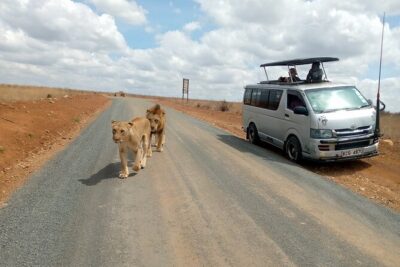
Nairobi National Park Half-Day Tour; Free Wi-Fi connection
Read our review →
National Park & Optional Elephants & Giraffe Center
Read our review →
NAI NAMI: Nairobi Storytelling Tour with Street Children
Read our review →